
FAQ - Frequently Asked Questions
Ad: Travel Itinerary: How to use travel itinerary feature
How to use the Travel Itinerary Feature:
Important:
The Travel Itinerary feature lets you update your current location, future destinations, and specific places you plan to visit on a given day.
Ad: Travel Itinerary Guidelines
- Ensure your itinerary reflects your actual or planned locations, so clients know where to find you.
- You may list multiple places in a day, but they must be feasible within travel and appointment time.
- A single day’s travel should not exceed 150 km by car, bus, or train, subject to local conditions.
- Do not list far-apart locations for consecutive days or overly ambitious schedules—it’s unprofessional and misleading.
- Avoid frequent or same-day changes to your location to appear in multiple places.
- Violations will lead to account termination, blacklisting, and banning.
-------------------
(Video guides are available at the bottom of this page for your convenience.)
Instructions for using the Travel Itinerary feature:
Start by navigating to your ad dashboard, then click on the Travel Itinerary link in your ad menu.
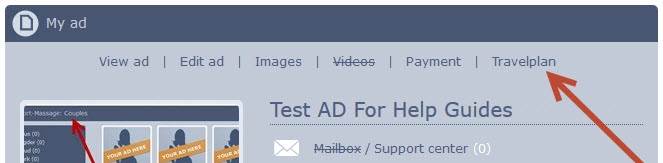
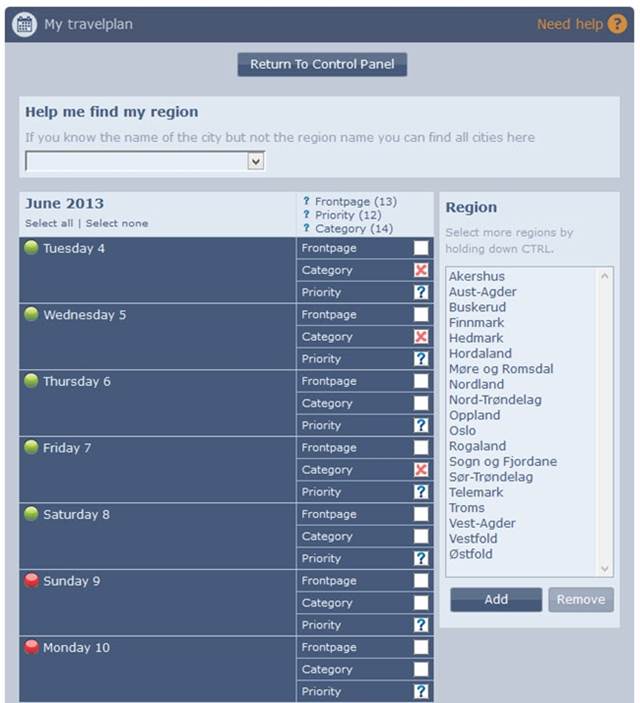
You will then be presented with your Travel Itinerary, which looks like this:
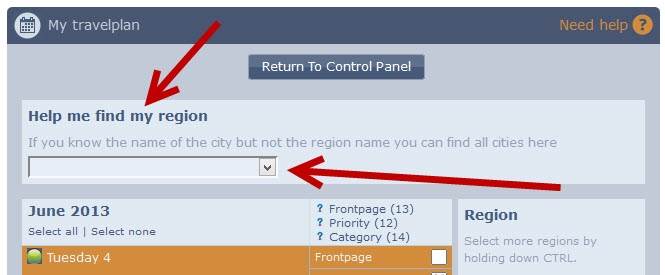
If you're unsure of the region you're in, locate the city here and we'll inform you of the region.
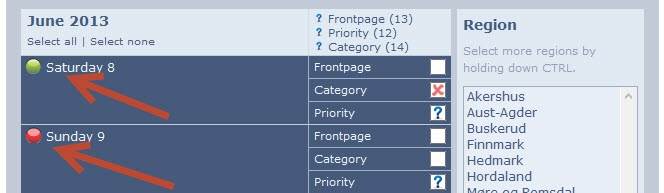
Days when you are online are marked with a GREEN dot, and days when you are offline are marked with a RED dot.
(To increase your online days, return to your ad settings and click on the payment link.)
-------------------
Setting your Travel Itinerary for a single region:
Choose the days you wish to manage (click on the day), they will turn an orange/gold color.
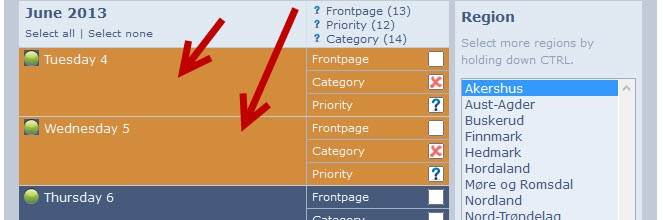
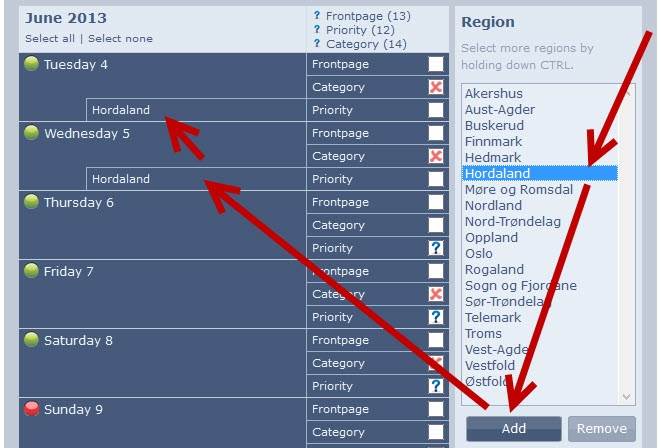
Next, select the region where you want to advertise.
Click 'add', and your Travel Itinerary will update to show that you are listed in that region.
-------------------
Setting your Travel Itinerary for multiple regions:
Choose the days you wish to manage (click on the day), they will turn an orange/gold color.
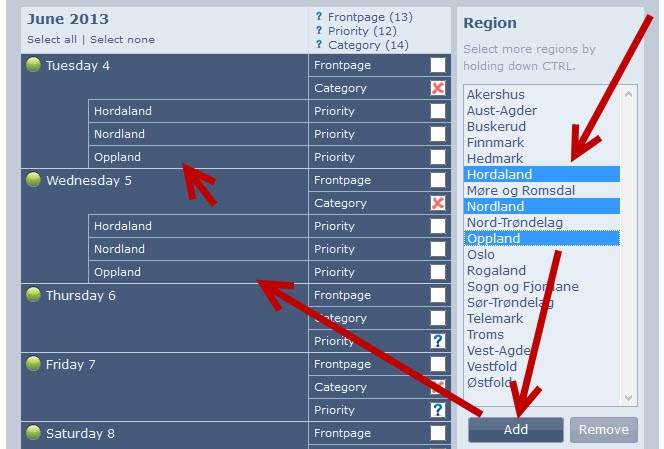
Next, select the regions where you want to advertise.
(You can select multiple regions by holding down the CTRL key on your keyboard.)
Click 'add', and your Travel Itinerary will update to show that you are listed in the regions you selected.
-------------------
Setting your Travel Itinerary for one or more cities:
Choose the days you wish to manage (click on the day), they will turn an orange/gold color.
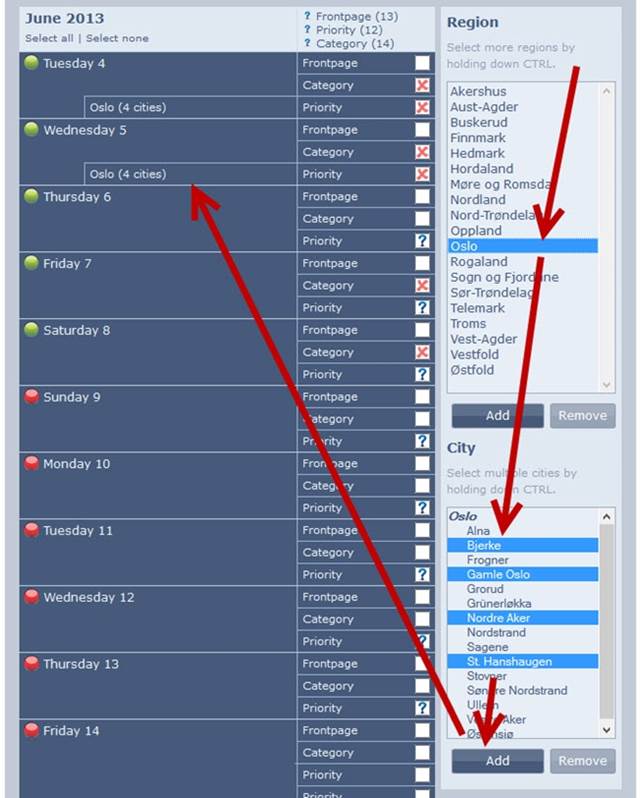
Next, select the region where the city or cities you want to advertise in are located, and select the city or cities.
Click 'add', and your Travel Itinerary will update to show that you are listed in the selected city or cities.
-------------------
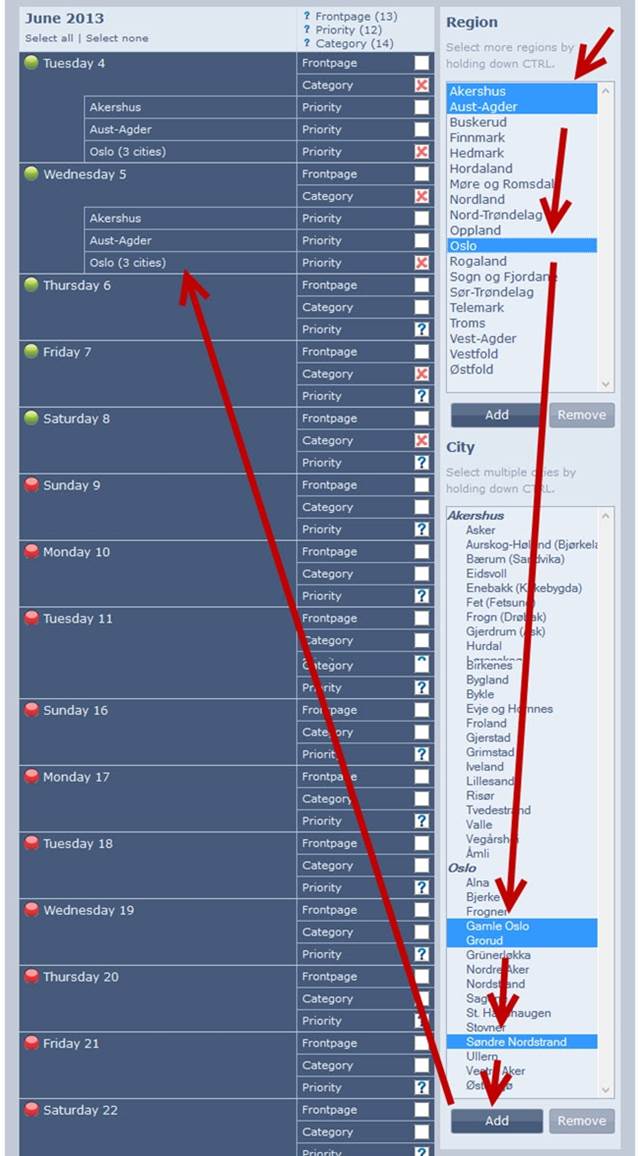
Setting your Travel Itinerary for one or more regions and one or more cities simultaneously:
Choose the days you wish to manage (click on the day), they will turn an orange/gold color.
Next, select the region or regions you are in or want to advertise in, and also select the regions where the cities you want to advertise in are located.
Click 'add', and your Travel Itinerary will update to show that you are listed in the selected city or cities.
-------------------
Learn More About FrontPage ad?
Learn More About Category ad?
Learn More About Priority ad?
Click on the ? mark here to access the guides.

Video Guides:......................
FAQ - How to set travelplan in one or more regions, cities
Important:
The Travel Itinerary feature lets you update your current location, future destinations, and specific places you plan to visit on a given day.
Ad: Travel Itinerary Guidelines
- Ensure your itinerary reflects your actual or planned locations, so clients know where to find you.
- You may list multiple places in a day, but they must be feasible within travel and appointment time.
- A single day’s travel should not exceed 150 km by car, bus, or train, subject to local conditions.
- Do not list far-apart locations for consecutive days or overly ambitious schedules—it’s unprofessional and misleading.
- Avoid frequent or same-day changes to your location to appear in multiple places.
- Violations will lead to account termination, blacklisting, and banning.
-------------------
(Video guides are available at the bottom of this page for your convenience.)
Instructions for using the Travel Itinerary feature:
Start by navigating to your ad dashboard, then click on the Travel Itinerary link in your ad menu.
You will then be presented with your Travel Itinerary, which looks like this:
If you're unsure of the region you're in, locate the city here and we'll inform you of the region.
Days when you are online are marked with a GREEN dot, and days when you are offline are marked with a RED dot.
(To increase your online days, return to your ad settings and click on the payment link.)
-------------------
Setting your Travel Itinerary for a single region:
Choose the days you wish to manage (click on the day), they will turn an orange/gold color.
Next, select the region where you want to advertise.
Click 'add', and your Travel Itinerary will update to show that you are listed in that region.
-------------------
Setting your Travel Itinerary for multiple regions:
Choose the days you wish to manage (click on the day), they will turn an orange/gold color.
Next, select the regions where you want to advertise.
(You can select multiple regions by holding down the CTRL key on your keyboard.)
Click 'add', and your Travel Itinerary will update to show that you are listed in the regions you selected.
-------------------
Setting your Travel Itinerary for one or more cities:
Choose the days you wish to manage (click on the day), they will turn an orange/gold color.
Next, select the region where the city or cities you want to advertise in are located, and select the city or cities.
Click 'add', and your Travel Itinerary will update to show that you are listed in the selected city or cities.
-------------------
Setting your Travel Itinerary for one or more regions and one or more cities simultaneously:
Choose the days you wish to manage (click on the day), they will turn an orange/gold color.
Next, select the region or regions you are in or want to advertise in, and also select the regions where the cities you want to advertise in are located.
Click 'add', and your Travel Itinerary will update to show that you are listed in the selected city or cities.
-------------------
Learn More About FrontPage ad?
Learn More About Category ad?
Learn More About Priority ad?
Click on the ? mark here to access the guides.
Video Guides:......................
FAQ - How to set travelplan in one or more regions, cities